Google Scholar is the first stop for most literature searches, yet most students use about ten percent of it. These are the features and operators that separate a frustrating scroll from a precise, repeatable search.
Who this guide is for
This guide is for students who already use Google Scholar but feel it is using them — endless scrolling, thousands of near-identical results, and the nagging sense that the perfect paper is in there somewhere. Scholar rewards technique far more than effort. The operators and habits below are the difference between a search you repeat weekly and a search you build once and reuse all year.
Search operators that actually matter
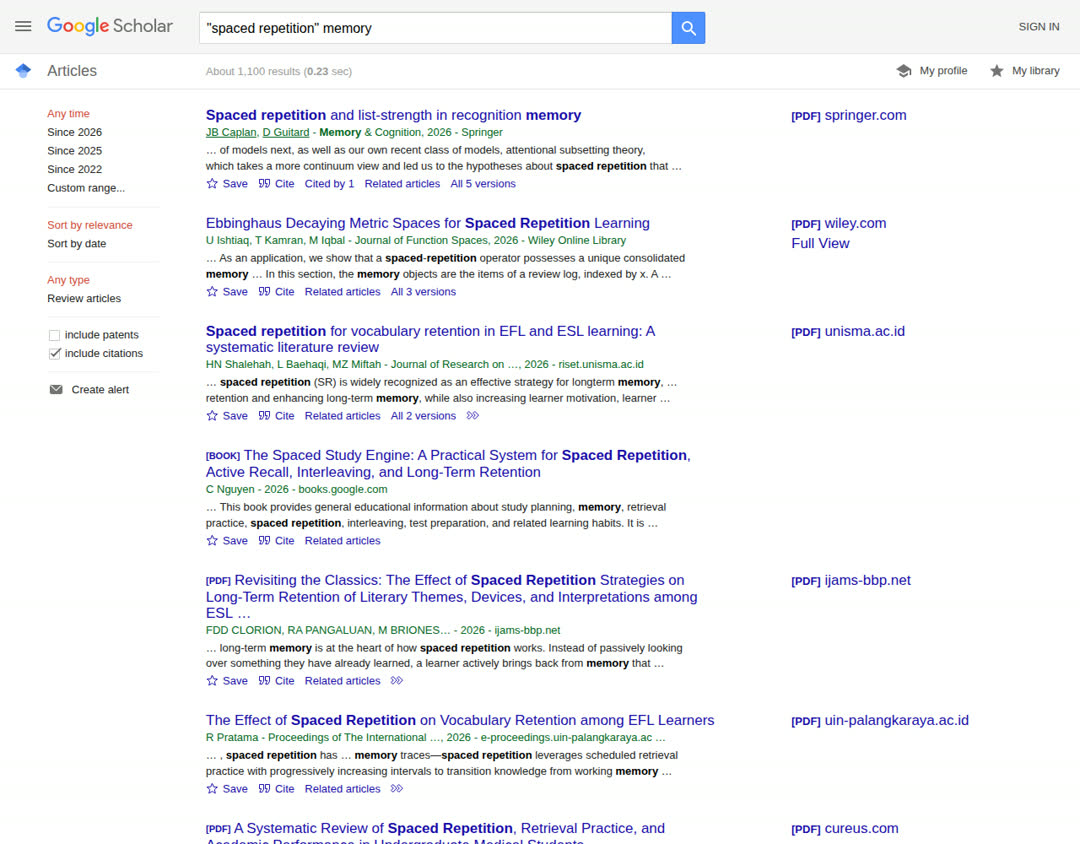
Quotation marks force an exact phrase: "spaced repetition" finds that phrase, not the two words scattered anywhere.
intitle: restricts terms to the paper's title — intitle:"meta-analysis" sleep returns tightly focused results.
author: finds a specific researcher: author:"Roediger" memory.
A minus sign excludes noise: jaguar -car -animal.
The date filters in the left sidebar keep fast-moving fields current.
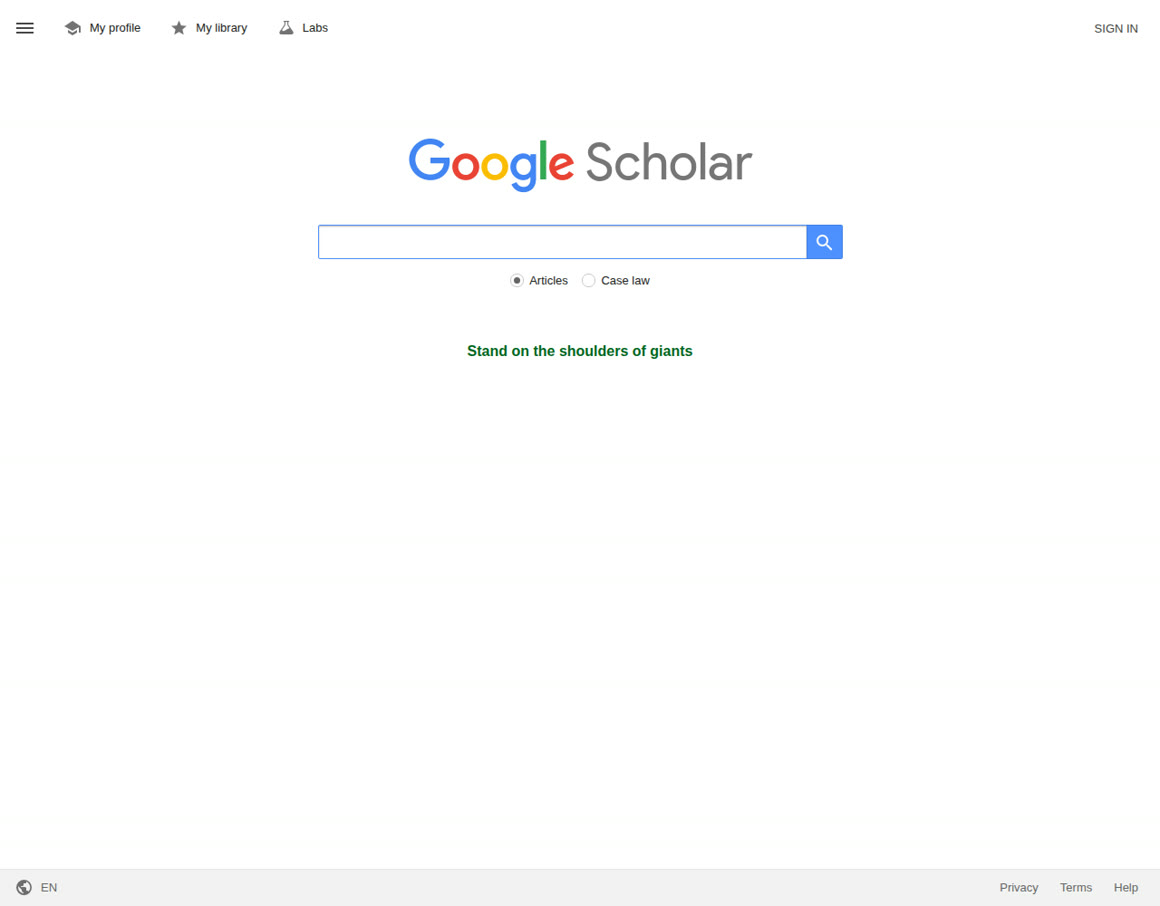
The Scholar home page is deliberately plain: one box, no clutter. Everything in this guide happens from here and from the results page. Screenshot from scholar.google.com.
A worked example pulls the operators together. Suppose your topic is the effect of spaced practice on vocabulary learning. A plain search returns a flood. Now build it up: "spaced repetition" intitle:vocabulary — the quotes lock the phrase, intitle: forces your second concept into titles, where serious papers on the topic put it. Add author:"Karpicke" if you know a key name, or -survey to cut noise. Each operator you add trades breadth for precision, and you can loosen them one at a time if the results dry up. Two more worth knowing: OR between synonyms ("spaced practice" OR "distributed practice") catches papers that use the other term, and source: restricts to one publication, as in source:"Psychological Science".
Use 'Cited by' as a time machine
Found one perfect paper from 2015? Click 'Cited by' beneath it to see everything that has built on it since — often the fastest way to reach the current state of a debate. Combine it with the date filter to read only the last three years of follow-up work.
A quoted-phrase search in action. Note the date filters and 'Create alert' in the left sidebar, and under each result: Save, Cite, and 'Cited by' — the three links this guide uses most. Screenshot from scholar.google.com.Operators turn the search box from a slot machine into an instrument.
Set up alerts instead of re-searching
Run your best search once, then click 'Create alert'. Scholar emails you when new matching papers appear. For an active thesis topic, two or three well-built alerts replace a weekly manual search — and you will never miss the paper your examiner asks about.
Handy tip
Create one alert for your exact topic phrase and one for the two or three authors who publish most in your area — author alerts come from their profile pages.
Reading a results page like a researcher
Three links under every result do quiet heavy lifting. 'Cite' (the quotation-mark icon) produces a formatted reference in MLA, APA or Chicago style — handy for a quick check, though you should export to your reference manager for real work: in Settings, Bibliography Manager, choose BibTeX and every result gains an 'Import into BibTeX' link. 'All versions' clusters the copies of a paper scattered across the web — the publisher's page, a repository copy, an author's PDF — and the freely readable one is often hiding there. The star, 'Save', files the paper in your Scholar library if you are signed in, a light reading list that syncs across devices.
Connect your university library
In Settings, under Library links, add your institution. Scholar then shows a library link beside results, turning paywalled dead ends into one-click full texts through your university's subscriptions. While you are in Settings, set the bibliography export to BibTeX so results can drop straight into Zotero or another reference manager.
Alerts and citation tracking let the literature come to you between searches.
Know the limits
Scholar indexes broadly, including some low-quality and predatory sources, and its citation counts can be inflated by duplicates. Use it for discovery, then judge each paper on its journal, methods and authors — and cross-check key sources in your library's curated databases.
Pro tips for literature hunters
Search a DOI in quotes when you half-know a paper: the exact-match result usually includes the cleanest copy and its full citation trail.
When a search fails, remove elements in reverse order of confidence — drop the author first, then the intitle:, keep the quoted phrase last. Each step roughly multiplies your results.
Use the 'Sort by date' toggle for a final sweep on any topic. The newest papers cite the established ones, so a date-sorted pass often surfaces the debate's current frontier in minutes.
Keep a search diary: query, date, and how many results you kept. Supervisors and future-you will ask how the literature was found, and 'I searched Scholar' is not a methods section.
Troubleshooting: Scholar behaving badly
Too many results (millions). Your terms are too general. Add a quoted phrase first, then intitle:, then a year range. If results are still unmanageable, your topic is a field, not a question — narrow the population, method or setting before searching again.
Almost no results. Loosen in the opposite order: drop intitle:, unquote the phrase, and add synonyms with OR. Also check spelling of author names — Scholar is literal, and one wrong initial can hide a whole career.
'Our systems have detected unusual traffic.' Scholar rate-limits shared networks, VPNs and over-eager refreshing. Slow down, avoid hammering the next-page button, and if your campus network triggers it constantly, searching while signed in usually calms it down.
Every promising paper is paywalled. Work the checklist: library links switched on, 'All versions' checked, the title searched in your library catalogue, and the author's name plus the title in a normal web search for a repository copy. Interlibrary loan is the final, legitimate step — librarians do this daily.
Ten minutes spent learning these features pays back on every assignment you will ever research. Build the searches once, save them as alerts, and let the literature come to you.
Frequently asked questions
Is Google Scholar free to use?
Yes, searching is completely free and needs no account. Signing in with a Google account adds the personal library, alerts and library-link settings, but the index itself is open to everyone.
Why do my lecturers prefer library databases over Scholar?
Databases such as Scopus, Web of Science or your subject's specialist index are curated: journals are vetted, metadata is clean, and searches are reproducible. Scholar indexes almost everything, including weak sources. Use Scholar for discovery speed, then verify key papers in curated sources.
How do I get Scholar results into Zotero?
Two ways: click the Zotero Connector icon in your browser while viewing results (it can save several at once), or set the bibliography export to BibTeX in Scholar Settings and use the import link under each result.
Are Scholar's citation counts trustworthy?
As a rough signal, yes; as a precise measure, no. Counts can be inflated by duplicate records and include citations from theses, slides and preprints. For anything evaluative, compare with a curated database.
Can I search Scholar in languages other than English?
Yes — Scholar indexes scholarship in many languages, and the interface language can be changed in Settings. Searching with terms in the paper's language usually finds material an English-only search misses.
The Fundora Editorial Team is a small group of educators, researchers and tech writers. We test the tools and methods we recommend, prefer free options, and update our guides when things change.
Your thesis topic will live with you for months, so choose it properly. Learn how to brainstorm widely, test ideas against interest, feasibility and contribution, and narrow a vague interest into a question you can actually finish.
A research proposal is a promise and a plan. Learn the sections reviewers expect, how to frame a sharp question, write a methodology that survives scrutiny, and the feedback loop that turns a draft into an approval.
Research papers are not novels. Learn the three-pass method — skim, read, interrogate — with time budgets, a comparison table and the five-question note that makes papers stick.
22 October 2026· 8 min read
The Fundora Letter
Never miss a post
One useful guide, every Sunday — the week's best study, research and AI-tool guides, delivered quietly to your inbox. No spam, no selling your address — unsubscribe any time.
Signups are handled by Brevo, our email service — your address is stored on Brevo's servers so we can send the letter. It is never sold, and every issue has an unsubscribe link.
Fundora uses cookies to analyse traffic and improve your experience. Learn more